Selasa, 02 Maret 2010

How to Change Facebook Layout

. Selasa, 02 Maret 2010
0 comments

facebook logo
Are you one of facebook fan? I'm sure that you are be bored with the layout-that's all, well now there is a great way to change your facebook layout, you wonder? If curious, please read the following tips.

  • First you have to install firefox add-ons, click here to open and click anggiung a firefox to install 
    Mozilla ads-on
  •  After installed restart your firefox and login to your facebook account.
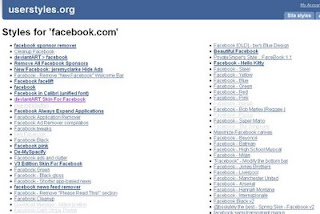
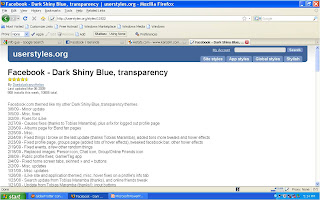
  • When you have click the facebook layout do you like, it will appear below the image
layout facebook
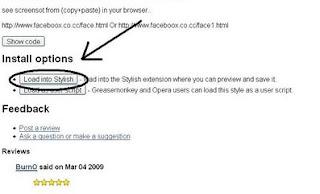
  •   Then scroll down until you get install option and click a load writing stylish 
Install Option
  •  The last is back to your facebook profile and presh F5 to apply your new facebook layout
  • I think it is so easey....enjoy it


Read More »»

Cara menghapus Virus autorun.inf

.
0 comments

Virus yang satu ini memang sering bikin kesal banyak user komputer, pasalnya virus autorun.inf ini alias k4l0n6 kata orang gk bisa dihapus, meskipun cara kerjanya gak separah virus brontok, trojan dsb, tetapi virus ini sering memebuat kita naik darah. Ditambah lagi virus autorun.inf ini sangat cinta flashdisk kwkwk..Menghapus virus autorun.inf tidak serumit yang anda fikir, ada trick khusus yang digunakan untuk menghapus virus yang satu ini. Mau tahu caranya?...silakan perhatikan step by step cara menghapus virus autorun.inf dibawah ini.
 
  1. Buka My Computer pilih Tools/Folder Options/unchecked hidden software, anda juga bisa menambahkan chek hidden file.
  2. Kemudian lihat di Root Directory (C), terlihat ada file “k4l0n6.sys.vbs”. Inilah  file induk virus kalong tersebut.
  3. File “k4l0n6.sys.vbs” ini tidak dapat anda hapus sebelum anda menghapus file yang terkait dengan file ini.
  4. Buka dan pelajari virus tersebut cukup dengan Notepad atau text editor lainnya
  5. Jalankan Start/Run dan ketik REGEDIT, trus aapus file-file yang ada hubungannya ama virus kalong sebagai berikut.
  6. Hapus “X2 ATTCK” ada di "HKEY_CURRENT_USER/Software /Microsoft/Internet Explorer/Main/Window Title",":: X2 ATTACK ::"
  7. Hapus KALONG-X2/1 ada di "HKEY_CURRENT_USER/Software/Microsoft/Windows /CurrentVersion/Explorer/RunMRU/a", "KALONG-X2/1"
  8. Hapus “a” ada di "HKEY_CURRENT_USER/Software/Microsoft /Windows/CurrentVersion/Explorer/RunMRU/MRUList", "a"
  9. Hapus tulisan vaksin.com ada di "HKEY_CURRENT_USER/Software/ Microsoft/Internet Explorer/Main/Start Page", "http://www.vaksin.com"
  10. Hapus Kalong X2 ada di "HKEY_LOCAL_MACHINE/Software/Microsoft/ Windows/CurrentVersion/Winlogon/LegalNoticeCaption", "KALONG-X2"
  11. Hapus kata-kata Komputer anda Diambil alih ada di "HKEY_LOCAL_MACHINE/Software/Microsoft/ Windows/CurrentVersion/Winlogon/LegalNoticeText", "Komputer Anda Diambil Alih"
  12. Hapus file recycle.vbs ada di "HKEY_LOCAL_MACHINE/Software/Microsoft/ Windows/CurrentVersion/Run/Ageia", syspath & "/recycle.vbs"
  13. Terakhir hapus file “autorun.inf” di root directory ini mencegah induk virus membuat filenya kembali setiap kali dihapus.
  14. Lalu restart komputer agan. Mud-mudahan anda berhasil..selamat mencoba....


Read More »»

Overcome Kaspersky 7 Blacklist Key by using Patch

.
0 comments


Your user antivirus kaspersky (KAV 7) must be dizzy with the key on kasperksy blacklist, kaspersky have their own methods to detect the keygen you are using, typically used detector key kaspersky team updates that are stored on your download free from kaspersky server, so you can not ran from kaspersky key blacklist. Now for your user kaspersky 7 (KAV 7), no matter hawatir with this one, because there are practical and easy solution that you can do to fix the problem blaklist kaspersky without any problems. The following are tips tricks to overcome kaspersky 7 blacklist for you.
* Download the patch here antiblacklist kaspersky
* It is recommended to disable your Internet connection before patching process kaspersky key, so   that the detection engine kaspersky team did not detect the fraud you are .. he .. he ..
* Perform installation kaspersky 7 (KAV 7) on your computer, for ana who has previously installed kaspersky 7, please renew your key using the key you have, click the left icon in the tray on the kaspersky bottom right corner, select the box kaspersky Activation of appears, and then install the key, and select use existing license key (key pilihkah old effective date, the longer the better). See Fig.
install key
* Once you click next you please enter your KAV7 key.
     * For those of you using kaspersky key 7.0.0.125 please download it here
     * In recommend to restart your PC after making your kaspersky renew key
     * After the computer logs on again, do not update your kaspersky
     * Turn off the Enable-Self-Defense by right clicking tray icon kav7 at the bottom right corner of your computer desktop, then select settings, then click Service, and remove the checkmark in the box to Enable Self-Defense, and then click Apply or ok. To more clearly see the picture below:

* It is recommended to disable your Internet connection before patching process kaspersky key, so   that the detection engine kaspersky team did not detect the fraud you are .. he .. he ..
* Perform installation kaspersky 7 (KAV 7) on your computer, for ana who has previously installed kaspersky 7, please renew your key using the key you have, click the left icon in the tray on the kaspersky bottom right corner, select the box kaspersky Activation of appears, and then install the key, and select use existing license key (key pilihkah old effective date, the longer the better). See Fig.
install keyexiting licensy

* Once you click next you please enter your KAV7 key.
     * For those of you using kaspersky key 7.0.0.125 please download it here
     * In recommend to restart your PC after making your kaspersky renew key
     * After the computer logs on again, do not update your kaspersky
     * Turn off the Enable-Self-Defense by right clicking tray icon kav7 at the bottom right corner of your computer desktop, then select settings, then click Service, and remove the checkmark in the box to Enable Self-Defense, and then click Apply or ok. To more clearly see the picture below:
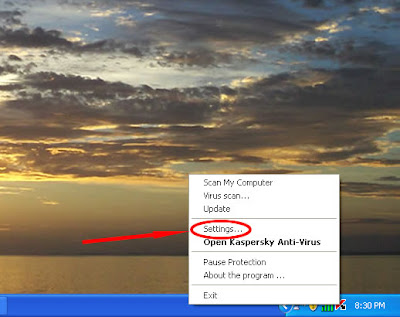
setting
service
self defence
  • Disable kaspersky 7 with right-click your tray icon and select exit

  • Extaract Patch KAV 7 that you downloaded earlier by using winrar, the program files ==> Kaspersky Lab ==> Kaspersky Anti-Virus 7.0, or in other words that you copy the patch to extract the destination shown on the drawing (files that you copy to the destinations above is that there is a patch application in a folder, not the folder).


  • Run your application kaspersky patch, and then click Clean.
  • Once you click on Clean, click again writing Patch Kaspersky Anti-Virus version 7. For more details, see the picture below:


  • After the above process has been done, click exit on the patch and update your Kaspersky 7, recheck Enable self-Defense again Kaspersky God willing you will be safe from the blacklist. Good try.
    for reservation click link below don forget original is best.


Read More »»

Senin, 01 Maret 2010

Cara promosi Link yang Efektif

. Senin, 01 Maret 2010
0 comments

Cara promosi link affiliate yang efektif menurut saya adalah beriklan dengan PPC. Menurut pengalaman saya berpromosi selama ini, iklan PPC adalah yang paling efektif dibandingkan dengan cara-cara lainya.

Kenapa ??
Karena iklan PPC bisa mendatangkan banyak pengunjung secara instant tanpa repot-repot menyebar sendiri link affiliate anda. Dengan beriklan PPC iklan anda akan langsung tersebar di ribuan blog/website orang lain. Jadi sangat efektif untuk mendatangkan pengunjung ke blog anda.

Tapi kelemahan dari iklan PPC adalah anda harus membayar setiap traffik. Anda membayar sekitar Rp300-500an untuk setiap klik yang terjadi pada link anda. Kalau saja ada yang gratis.... Betapa enaknya....

Tapi Jangan takut atau ragu untuk mengeluarkan modal. Karena biasanya untung yang anda dapat bisa berkali-kali lipat dari modal yang anda keluarkan.

Jika anda berminat untuk beriklan PPC yang sangat efektif ini, silahkan kunjungi situs-situs penyedia layanan PPC dibawah ini :
- kumpulblogger 
- adspeedy
- adsenseCamp
dll......


Read More »»
 

Iklan Kecik